# Idle hibernation
Understand what goes to sleep, how it wakes up, and where to change the timer.
Source: https://docs.rumata.xyz/guides/hibernation
Reviewed: 2026-11-01
## When a backend service sleeps
Open System Explorer → Services and inspect the service’s runtime policy. Sleep when idle allows an on-demand HTTP service to suspend and wake on a permitted request. Startup can delay that request; distinguish a retryable startup failure from application authorization or capacity rejection.
Use Always on when continuous execution is required. Stop after duration expires even while the service is busy. An HTTP-disabled worker cannot wake from an HTTP request; choose a policy appropriate to its work. A backend persistent disk and the retained development workspace can still consume storage while compute is stopped.
## When an activity is idle
An activity deployment can sleep between calls. In its deployment settings, choose [Idle before sleeping](https://docs.rumata.xyz/guides/controls-activities#deployment), then select [Deploy activity](https://docs.rumata.xyz/guides/controls-activities#deployment). The first workflow call after sleep waits for the activity to wake. Allow for a cold start and inspect the reported status instead of assuming a fixed startup time. [Activity deployment settings](https://docs.rumata.xyz/guides/controls-activities#deployment).
## When the building workspace goes idle
The [development machine](https://docs.rumata.xyz/guides/development#machine) runs your chat tools, preview, and code editor. It can pause after inactivity. On your next visit, let it start or resume before using the preview. A paused [development machine](https://docs.rumata.xyz/guides/development#machine) does not by itself take your published frontend offline.
Open [Factory Settings](https://docs.rumata.xyz/guides/controls-factory#factory-details) to review retained workspace storage and the available idle controls. Source survives supported machine stops and recreation; active processes and dependency caches do not. [Machine settings and shutdown behavior](https://docs.rumata.xyz/guides/controls-factory#persistence-idle).
## When the database goes idle
The database has a separate sleep timer. It wakes on the next connection, so the first request after a quiet period may take longer. [Database](https://docs.rumata.xyz/guides/controls-database-tables#table-browser) activity resets the timer.
## Change the database sleep timer
Open [System Explorer](https://docs.rumata.xyz/guides/controls-preview#navigation) → [Database](https://docs.rumata.xyz/guides/controls-database-tables#table-browser) → [Operations](https://docs.rumata.xyz/guides/controls-database-operations#operations) → [Idle hibernation](https://docs.rumata.xyz/guides/controls-database-operations#sleep). Choose a preset or enter [Days](https://docs.rumata.xyz/guides/controls-database-operations#sleep), [Hours](https://docs.rumata.xyz/guides/controls-database-operations#sleep), and [Minutes](https://docs.rumata.xyz/guides/controls-database-operations#sleep) within the displayed limits. Review the total, then select [Save sleep timer](https://docs.rumata.xyz/guides/controls-database-operations#sleep). [Cancel](https://docs.rumata.xyz/guides/controls-database-operations#sleep) leaves it unchanged.
The same control is available in the extended [Overview](https://docs.rumata.xyz/guides/controls-overview#snapshot). The policy applies to the entire [billing account](https://docs.rumata.xyz/guides/billing#account), not just the screen you opened. [Sleep timer controls](https://docs.rumata.xyz/guides/controls-database-operations#sleep) · [Quotas](https://docs.rumata.xyz/guides/billing).
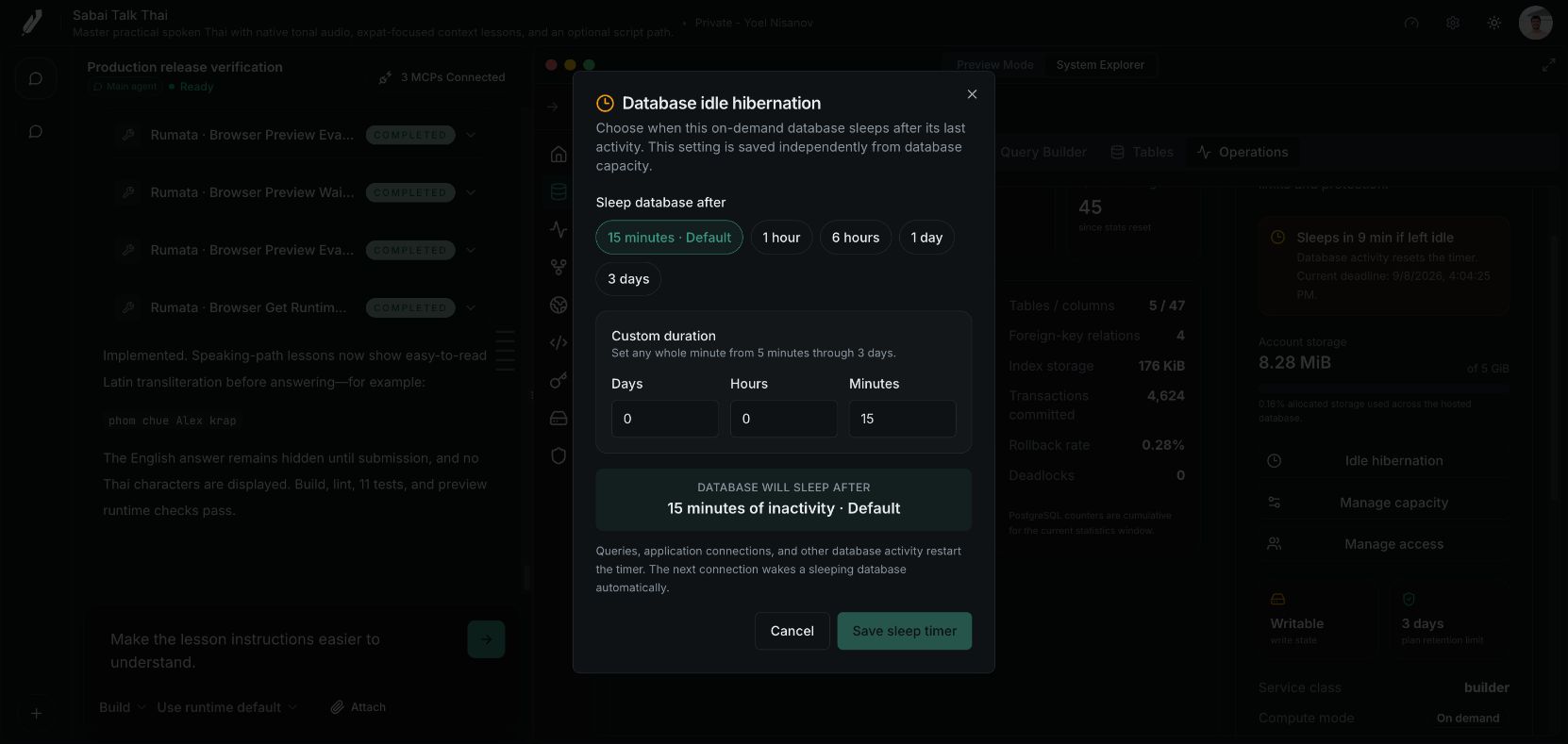
Reference capture from the separate Sabai Talk Thai application (September 8, 2026). Opening the dialog does not change the timer. Cancel closes it; [Save sleep timer](https://docs.rumata.xyz/guides/controls-database-operations#sleep) applies your choice. This capture leaves the existing setting unchanged.
## Related guides
- [Code and development machines](https://docs.rumata.xyz/guides/development)
- [Factory settings & machine controls](https://docs.rumata.xyz/guides/controls-factory)
- [Database operations and recovery controls](https://docs.rumata.xyz/guides/controls-database-operations)
- [Understand plans and usage](https://docs.rumata.xyz/guides/billing)